

Long-term Logitech Harmony remote test
Advertisement
Read this article for free:
or
Already have an account? Log in here »
To continue reading, please subscribe:
Monthly Digital Subscription
$1 per week for 24 weeks*
- Enjoy unlimited reading on winnipegfreepress.com
- Read the E-Edition, our digital replica newspaper
- Access News Break, our award-winning app
- Play interactive puzzles
*Billed as $4.00 plus GST every four weeks. After 24 weeks, price increases to the regular rate of $19.95 plus GST every four weeks. Offer available to new and qualified returning subscribers only. Cancel any time.
Monthly Digital Subscription
$4.99/week*
- Enjoy unlimited reading on winnipegfreepress.com
- Read the E-Edition, our digital replica newspaper
- Access News Break, our award-winning app
- Play interactive puzzles
*Billed as $19.95 plus GST every four weeks. Cancel any time.
To continue reading, please subscribe:
Add Free Press access to your Brandon Sun subscription for only an additional
$1 for the first 4 weeks*
*Your next subscription payment will increase by $1.00 and you will be charged $16.99 plus GST for four weeks. After four weeks, your payment will increase to $23.99 plus GST every four weeks.
Read unlimited articles for free today:
or
Already have an account? Log in here »
Hey there, time traveller!
This article was published 20/05/2010 (5796 days ago), so information in it may no longer be current.
Now that we’ve made the switch to MTS Ultimate HD TV service, I wanted to update my long-term review of the Logitech Harmony One remote.
The first part of the review was posted back in 2008 as I began using the remote for the first time.
I noted then how easy it was to set up and begin using the remote. You only need a basic understanding of technology to get all of your components running off of the Harmony.
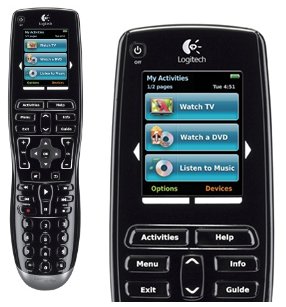
It comes with software and a USB cable so you can always keep it up to date.
The USB cable allows you to quickly and easily change or add components as your home theatre changes over time.
We are still pleased with the ergonomics, and switching between the PVR and the Xbox takes one virtual button press. Even after we switched components, we find everything we do on a regular basis is represented on the Harmony One, so we don’t need to juggle several remotes.
There are only two minor knocks against this model – the rechargable battery life seems to be iffy and you need to point it directly at most components to get it to function.
While the battery issue may rest with the batteries themselves developing a memory over time, I still find it a flaw worth noting. As for accurate aiming, that’s less of a big deal. Once you’re used to it, it becomes automatic. Plus, you need to hold it a certain way to read the activity choices on the remote screen anyway, so you’re already aiming it.

We’re planning on buying new rechargable batteries to see if that rectifies the short life. I will update the review once we’ve thoroughly checked that theory out.